DLL injection technique using undocumented Windows Native API functions to load a custom DLL into a running process.
What is DLL Injection
DLL injection is a programming technique that allows code, contained within a Dynamic Link Library (DLL), to be loaded and executed inside the address space of another process. This means the injected DLL can run with the same permissions and context as the target application.
Why inject?
placing code into another process often referred as process injection can be used for both good and bad, the difference lies in why it's being done and who is doing it.
On the legitimate side, many antivirus programs, security tools, and monitoring tools rely on code injection techniques to keep your system safe. For example, a security product might inject a small piece of code into every running application so it can watch what each program is doing in real time. This allows it to intercept important actions — a practice known as hooking such as when a program tries to create a new process, access sensitive data, or read/write a file, so the security tool can inspect and monitor that activity.
The reason they inject into each process instead of just a single DLL like ntdll.dll is because malicious behavior doesn’t always go through one predictable path. If they only hooked NTDLL, attackers could bypass detection by:
Manually mapping an unhooked version of NTDLL.
Making raw syscalls directly without using NTDLL.
Using higher-level APIs in other DLLs (kernel32.dll, , etc.) that internally trigger the same system calls.
user32.dll
Executing malicious logic entirely in user-mode before the syscall happens.
By injecting into each process, the security tool gains:
Full visibility into all API calls at multiple levels (user-mode and syscall level).
Context, such as the call stack, loaded modules, and memory contents when an action occurs.
Protection against hook removal, because hooks are spread across multiple DLLs in every process.
Detection of in-memory threats, like shellcode in RWX memory regions that never touch disk.
Take file access as an example. In normal use, a word processor like Microsoft Word mainly reads and writes document files. If security software detects that Word is suddenly trying to access system password files or make changes to the Windows registry, that’s unusual behavior. It could indicate that a malicious macro or exploit is running inside the program. In this situation, the injected monitoring code acts like a silent security guard, positioned inside the application to watch every move and stop anything suspicious before it causes harm.
Of course, the very same mechanism can be abused by attackers. Malicious actors can inject their own code into trusted programs to hide their activity, steal data, or execute harmful commands often without being detected. This dual nature is why DLL injection is considered both a powerful development tool and a potential security threat.
How it work?
On Windows, user-mode processes are isolated from one another each process has its own private memory space that other processes normally can’t access. This isolation is a core security feature, preventing programs from tampering with each other’s memory directly.
Every process executes code through threads, and a process needs at least one running thread to do anything.
When you want to inject code or a DLL into another process, the problem is twofold:
Placing the code into the target process’s memory
Getting the target process to execute that code
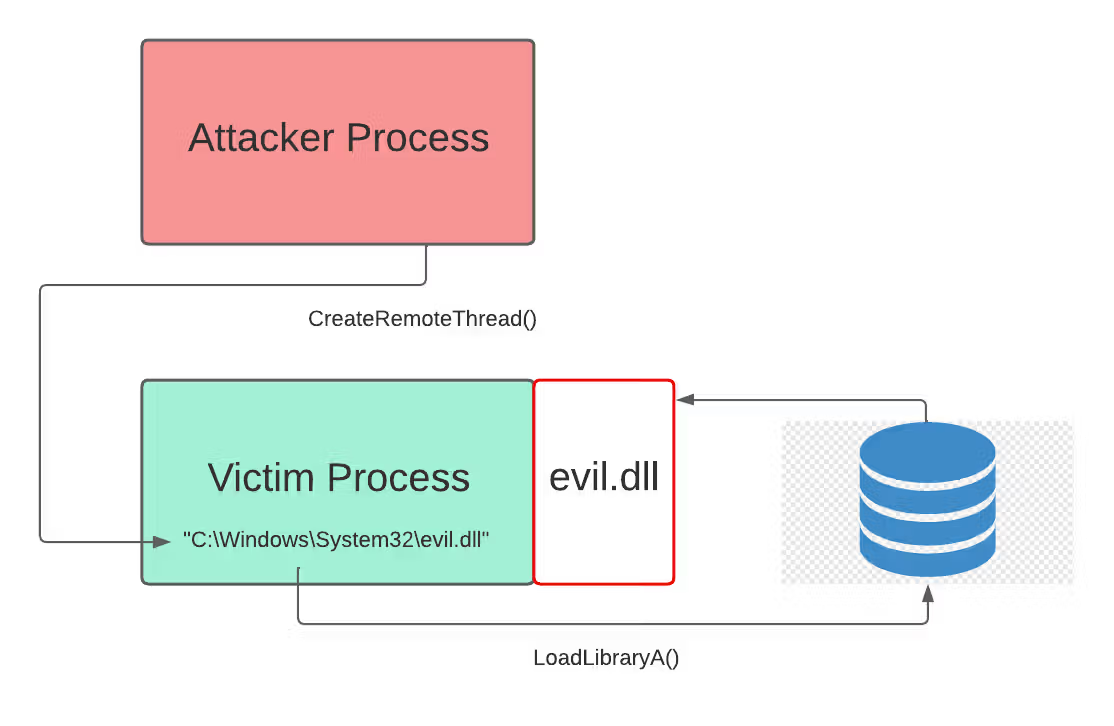
The simplest and most common method uses Windows API functions:
OpenProcess – Get a handle to the target process with the required permissions.
VirtualAllocEx – Allocate memory inside the target process’s address space for your code or data.
WriteProcessMemory – Write the code (or DLL path) into that allocated memory.
(Optional)ReadProcessMemory – Read from the target process’s memory if needed.
CreateRemoteThread – Start a new thread in the target process that begins execution at your injected code’s address.
This sequence is the classic approach to process injection. There are more advanced methods (like APC injection, thread hijacking, or reflective DLL loading), but this one is the most straightforward and widely used. in our example in github we will use undocumented functions to avoid detection.
Create payload
In this step, you can inject shellcode or a DLL, but in our example, we will create a DLL that will be loaded into the target process. First, to create a custom DLL, read the official Windows documentation.
In our example, the DLL code simply shows a message box with different messages depending on the callback.
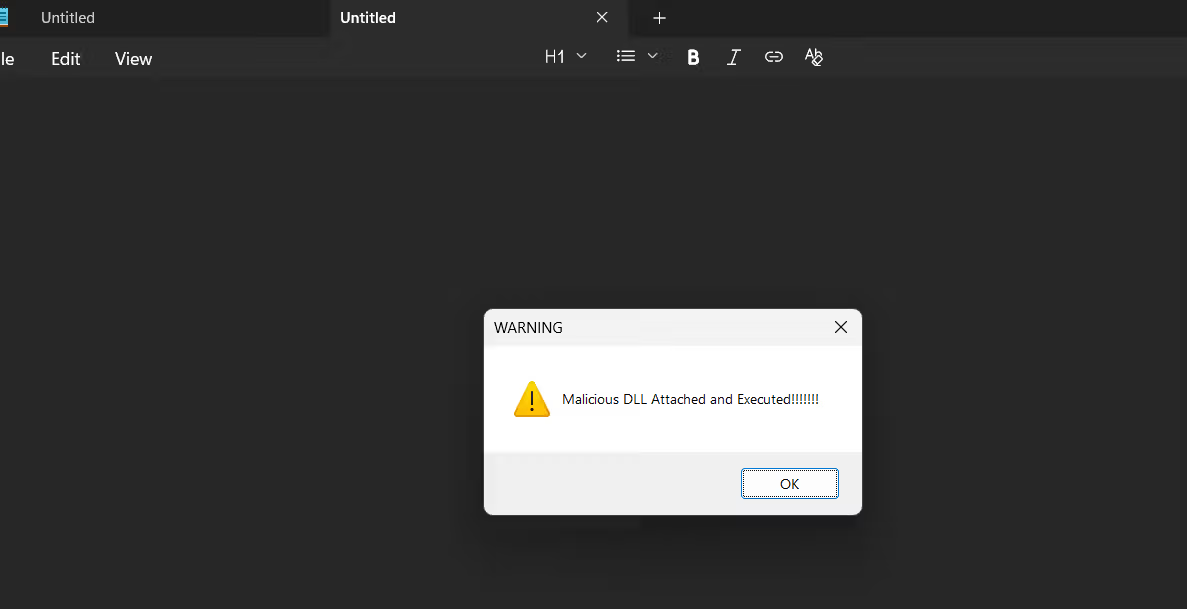
When the DLL is loaded into a process (DLL_PROCESS_ATTACH), it shows a message box saying "Malicious DLL Attached and Executed!!!!!!" to indicate that the DLL is now active.
When the DLL is unloaded from the process (DLL_PROCESS_DETACH), it shows a message box saying "Malicious DLL Detached!" signaling that the DLL is being removed.
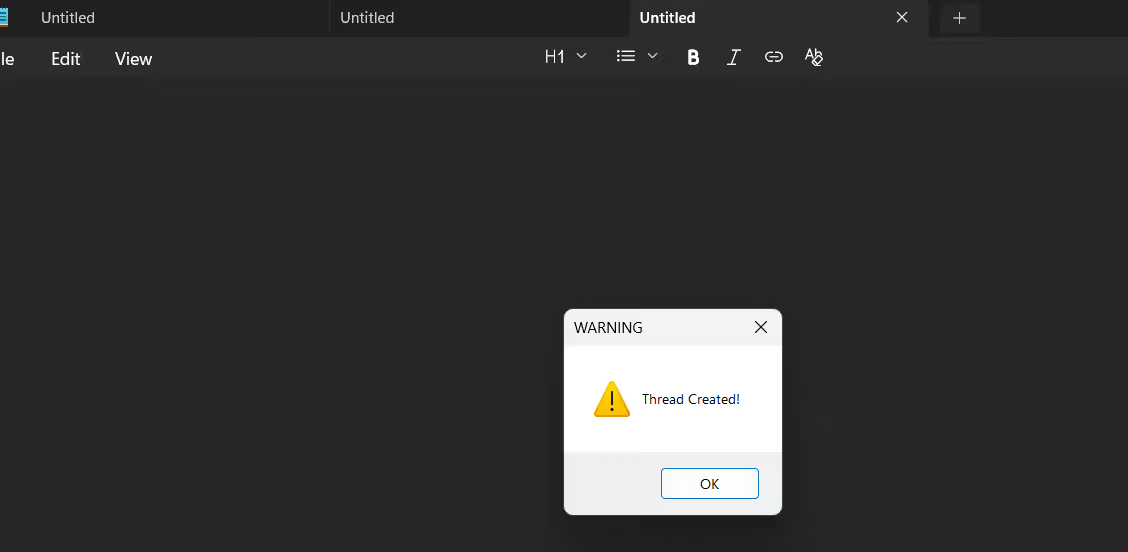
When a new thread starts in the process (DLL_THREAD_ATTACH), it shows a message box "Thread Created!" indicating a thread was created while the DLL is loaded.
Loading code block...
Code
in our example in GitHub, we used undocumented function. first we need to create function that dynamically load GetModuleHandle. this will allow us to use this function without showing in the Import Address Table (IAT). also some EDR hooks kernel32.dll Dynamic loading allows you to get the function pointer from ntdll.dll directly, or even resolve syscalls, bypassing those hooks. the function does the following:
The code gets the PEB (Process Environment Block) from the segment register (GS on x64, FS on x86). The PEB contains info about all loaded modules.
It goes through the linked list of loaded modules in peb->Ldr->InMemoryOrderModuleList.
For each module, it converts the wide-char DLL name to ANSI, makes it lowercase, and checks if it contains the given moduleName. If found, it returns the module’s base address.
If no match is found, it returns NULL.
Loading code block...
after getting the GetModuleHandle, which allow us to get handler for a module, we need a function that take a module handler, and function name. and parse the PE header of the module and search for the function we want and return the address of the function.
Check PE headers → Make sure the DLL at hModule is valid (MZ DOS header + PE NT header)
.Find Export Directory → Use the PE header’s data directory to locate where the list of exported functions is stored
.Read Export Tables:
AddressOfNames → All function names.
AddressOfFunctions → RVAs (Relative Virtual Addresses) of the function code.
AddressOfNameOrdinals → Links names to function addresses.
Search for the target function name.Return its absolute address (base address + RVA).
Loading code block...
after all that, in the main function we need the target PID, and the path of the DLL that we be injected in the target process. the main function does the following:
Check input arguments The program expects exactly 2 arguments:
Target process ID (PID)
Full path to the DLL file to inject If arguments are missing or incorrect, it prints usage instructions and exits.
Parse inputs
Convert the PID argument from string to DWORD.
Store the DLL path string.
Open target process handle
Use a manual ManualGetProcAddress + ManualGetModuleHandle to get the address of NtOpenProcess from ntdll.dll.
Prepare required structures (CLIENT_ID, OBJECT_ATTRIBUTES) with the PID.
Call NtOpenProcess with permissions to create threads and manipulate process memory.
If it fails, print error and exit; otherwise keep the process handle.
Allocate memory in target process
Get address of NtAllocateVirtualMemory from ntdll.dll using the manual method.
Allocate memory in the remote process sized to hold the DLL path string.
If allocation fails, print error and exit.
Write DLL path to allocated memory
Get address of NtWriteVirtualMemory.
Write the DLL path string into the remote process’s allocated memory.
If writing fails, print error and exit.
Get address of LoadLibraryA
Use manual method to find LoadLibraryA in kernel32.dll.
LoadLibraryA will be called remotely to load the DLL into the target process.
Create remote thread
Get address of NtCreateThreadEx in ntdll.dll.
Create a remote thread in the target process that starts by running LoadLibraryA, passing the address of the DLL path in the target process memory.
This causes the target process to load the DLL.
If thread creation fails, print error and exit.
Cleanup and finish
Close handles for the created thread and process.
Print success messages and exit
Loading code block...
Demo
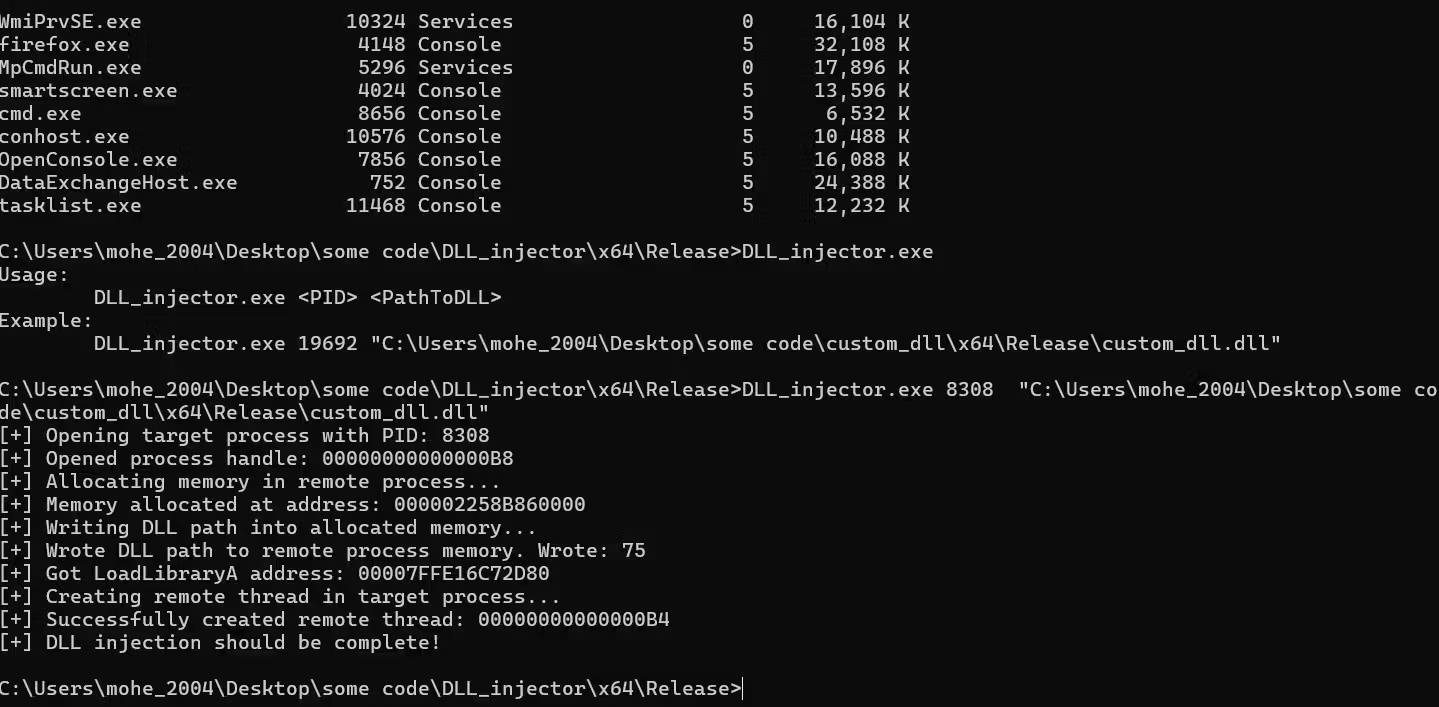
let's test the code and targeting notepad.exe
as we can see first we target the Process by PID, and the path of the payload.
if everything is fine, first callback should be triggered in the dll which is DLL_PROCESS_ATTACH, and it simply will show message like the following
and let's try to trigger the DLL_THREAD_ATTACH, this callback will run when process spawn a new thread, so let's open a new tab in notepad that should trigger this event
as we can see we go this message telling us that there is a new thread was created
You got the idea every action we make, the DLL will show a message. You can change the DLL code to make it run any code you want, or you can run shellcode instead of the DLL.
Other way
There are many ways to perform DLL injection. For example, instead of using LoadLibrary, we can manually map the DLL into the target process’s memory this method is called reflective DLL injection. Another method is using LoadLibrary combined with QueueUserAPC, which injects a DLL without creating new threads in the target process.
Windows also provides some built-in methods for DLL injection that are used for various legitimate purposes. One simple way is through specific registry keys:
By adding a DLL filename to the AppInit_DLLs value, that DLL will automatically be loaded into every process that loads User32.dll — which includes most Windows applications. This only works if the LoadAppInit_DLLs value is set to 0x00000001.
Final thought
DLL injection can be achieved through various techniques depending on the use case and level of stealth required. While common methods like using LoadLibrary or reflective DLL injection are widely used, there are also advanced approaches such as unhooking direct syscalls, indirect syscalls,API hashing, and others that offer greater evasion from detection and hooking by security software.