A fully custom HTTP server implemented in Go, supporting request parsing, partial parsing, static file serving, and dynamic endpoint handling.
What are we creating?
We’re creating a fully customized HTTP server in Go — no external libraries, just pure Go. You might be wondering, why reinvent the wheel when net/http already exists? Well, if you’re a nerd like me and love understanding how things work under the hood, this is the perfect blog for you. For example, you’ll see how to handle partial parsing of requests.
All you need before diving in:
Basic Go programming knowledge (you don’t have to be a pro).
A general idea of how TCP and HTTP work, like what is header and how they work and etc.
What we will build in this project?
Partial HTTP parsing – handle request line, headers, and body manually, including incomplete requests over TCP.
Routing requests – match incoming requests by method and path, support dynamic URL parameters like /users/{id}.
Middleware support – apply functions to requests before reaching the final handler, allow chaining similar to Express.js.
Custom response handling – send status codes (200, 400, 404, 500), write headers and body, support Keep-Alive connections.
Server lifecycle management – listen on TCP ports, manage connection timeouts, keep alive, and support graceful shutdown.
File Structure
This isn't the best file structure. feel free to adjust it to your needs. Here's the current layout.
cmd/main.go
Entry point of the application.
Usually contains the code to start the server.
internals/http/
Low-level HTTP handling utilities.
common.go → Shared HTTP functions and constants.
headers.go → Functions and types for handling HTTP headers.
request.go → Parsing and handling HTTP requests.
response.go → Constructing and sending HTTP responses.
route.go → Route definitions and parameter parsing.
server.go → Main server setup, listener, and request handling.
internals/type/
Definitions of constants, enums, and types used throughout the server.
contentType.go → MIME types.
error.go → Custom error types.
Method.go → HTTP methods (GET, POST, etc.).
parseState.go → Internal parsing states for request handling.
statusCode.go → HTTP status codes (200, 404, 500, etc.).
version.go → HTTP versions (1.0, 1.1, etc.).
internals/utils/url.go
Utility functions for URL parsing and manipulation.
static/
Directory for static files like HTML, CSS, JS, and images.
Loading code block...
Requests
HTTP over TCP
Let’s start with parsing the request. This can be the trickiest part at least it was for me. You might be wondering why. The thing is, in TCP, you might receive only part of the request in the first packet. For example, you could get just the method and path, then the next packet might contain headers, and maybe only part of the body.
The good news is, we don’t need to worry about putting everything in order TCP already handles that for us using sequence numbers. That itself is an interesting topic for another time.
For example, the first packet might contain:
GET /API
Looks incomplete, right? Then the next packet could bring:
HTTP/1.0\r\n
Once we combine them, we start to get the full request. From there, we can continue parsing headers, body, and everything else we need. full request will be GET /API HTTP1.0\r\n with all in mind let's start doing this.
Parsing
RequestLine holds the HTTP types.Method just method enum, path, and version. Request combines the request line, headers, body, parsing state like are we currently parsing Header or body or what this will make since in a mini, and URL parameters into one structure. It represents the full HTTP request received by the server.
Loading code block...
Don’t get scared, this function is actually pretty simple. First, we create a buffer of fixed size (like 1024 bytes) and initialize our request structure. We also set up buffLen, which keeps track of how much of the buffer is already filled.
Then we enter a loop that keeps reading from the client until the request is fully parsed (req.status == StateDone).
bytesRead, err := reader.Read(buff[buffLen:]).This line reads data from the client and writes it into the buffer starting from buffLen. After reading, we update buffLen so we know how much data is in the buffer. Next, we call the parser:
consumed, err := req.parsing(buff[:buffLen]).It will try to parse as much as it can. consumed tells us how many bytes were used. If we didn’t finish parsing or got an EOF, we handle that.
Finally, any leftover data in the buffer (that wasn’t consumed) is moved to the front so we can reuse the same buffer for the next read:
magine your buffer has "GET / HTTP/1.1\r\nHost: loca" and you just parsed "GET / HTTP/1.1\r\n" (16 bytes). That leaves "Host: loca" unprocessed.
By moving the leftover to the front and reducing the buffer length, the next read will append new data right after "Host: loca". This way, you don’t lose any unprocessed bytes and can keep using the same buffer efficiently.
We repeat this until the request is done. At the end, we return the fully parsed request. read → parse → move leftovers → repeat until done.
Loading code block...
Its job is to read the request step by step: first the request line, then headers, and finally the body. We also keep track of how many bytes we’ve “used” from the buffer with consumed.
We start a loop that keeps checking the current parsing state:
Request Line (StateRequestLine)
Calls parseRequestLine on the current data.
If it successfully parses something, we increase consumed and move to headers.
If there’s nothing to parse yet, we just return and wait for more data.
Headers (StateHeader)
Calls parseRequestHeader.
Same logic: increase consumed if we parsed something, then move to body.
Body (StateBody)
Checks Content-Length to know how many bytes to read.
Appends as much as possible from the current buffer to req.Body.
If we still need more data, return so the caller can read the next chunk.
Once the full body is read, we mark the request as done.
Done (StateDone)
We’ve finished parsing everything, so just return the number of bytes consumed.
The key idea: read a bit → parse a bit → keep track of consumed → repeat until done. This way we can handle requests that arrive in multiple packets.
Loading code block...
Let’s focus on parsing the request line first. The request line is the very first line of an HTTP request and looks like METHOD PATH VERSION, ending with \r\n.
The first thing we do is check if the data we have contains \r\n. If it doesn’t, that means we haven’t received the full line yet, so we just return 0 and no error. This tells the parser: “keep reading, we’re not done yet.”
Once we find the \r\n, we know we have the full line, so we can start processing it. We split the line by spaces to get three parts: the method, the path, and the version. If there aren’t exactly three parts, it’s an invalid request line and we return an error.
Next, we parse the method and version using helper functions, and save the method, path, and version into the request structure. Finally, we return the number of bytes we consumed (the length of the line plus the \r\n) so the parser knows how much of the buffer was used.
Loading code block...
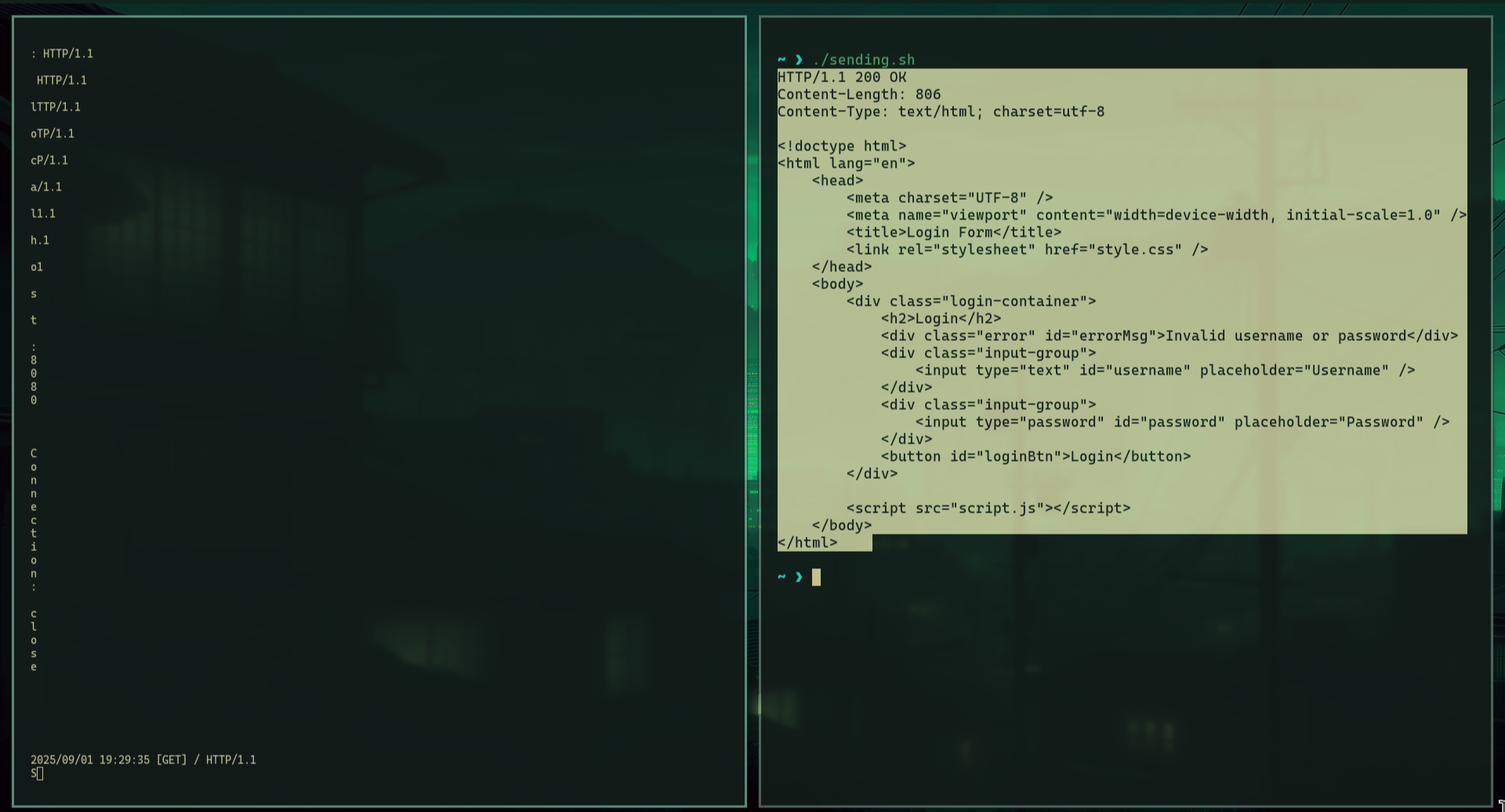
With this mechanism, we can receive requests partially. Let’s test it by sending characters one by one to see if our server handles it. Real TCP packets aren’t exactly like this, but it’s good for testing.
Loading code block...
as we can see it send the letter after letter and as we can see it the end the server responses with HTML which mean it is working
Header
Header parsing is simple. Each header line looks like key: value\r\n. We can store them in a map so it’s easy to look up values by key:
type Header map[string]string This way, Content-Length, Host, or any header can be accessed quickly. so we can create some helper to help us like
func (h *Header) Delete(key string) error
func (h Header) ForEach(f func(key, value string))
func (h *Header) Get(key string) (string, error)
func (h *Header) Set(key, value string) error
etc.
Response
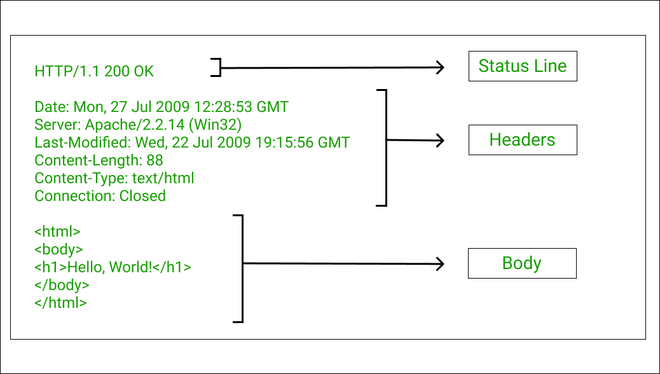
the response structure slimier to the request but with some differences. the only different as we can see the status line the Header and body structure are the exact same.
ResponseWriter is the structure we use to build and send HTTP responses.
write: where the response bytes go (usually the client connection).
idleTimeout: how long to wait before closing the connection if nothing happens. here i'm using it for keep alive it can be configured.
isKeepAlive: tells if the connection should stay open after sending the response.
Version: HTTP version for this response (like 1.0 or 1.1). this just enum values in the types folder
Status: the HTTP status code (200, 404, etc.). enum values in the types.
Headers: pointer to a map of headers (key: value) to send with the response.
Basically, this struct holds everything needed to construct and send a proper HTTP response to the client.
Loading code block...
I split sending the status line, headers, and body into separate functions so anyone creating an endpoint can easily customize the response, like changing headers, status, or body, without touching the core logic. You can set headers manually, or use the helper function I added to handle everything automatically, like func (w *ResponseWriter) SendResponse(body []byte) *types.RouteError, which takes the body and sets headers and sends the response dynamically.
let's start by sending the status line,function sends the status line of the HTTP response, which is the first line like HTTP/1.1 200 OK.
It gets the current status code from the ResponseWriter (w.Status).
It looks up the text for that status code (like OK for 200) from types.StatusText.
If the code is unknown, it returns an error.
Finally, it writes the full status line to the client in the format: HTTP version, status code, status text, followed by \r\n.
Loading code block...
The WriteHeader function sends all the HTTP headers to the client. It goes through each key-value pair in the Headers map and writes them as Key: Value\r\n. After sending all headers, it adds an extra \r\n to signal the end of the header section. This tells the browser or client things like content type, content length, or connection info.
Loading code block...
The WriteBody function is the simplest part: it just sends the actual response body to the client. Whatever bytes you pass to it HTML, JSON, text, or even an image get written directly to the connection.
Loading code block...
With all of that, let’s create two more functions to make sending responses easier. The first function is SetDefaultHeaders. Every time we send a response, we would otherwise need to manually set headers like Content-Length, Content-Type, Date, and possibly others. Doing this repeatedly would be tedious, so this function handles it automatically.
Here’s what it does:
Content-Length – ensures it matches the body size so the client knows how much data to expect.
Date – adds the header if missing, which is standard in HTTP responses.
Connection / Keep-Alive – manages whether the connection stays open or closes.
Content-Type – detects the type automatically if not already set, so clients know how to handle the data (HTML, JSON, image, etc.).
Loading code block...
The second function, SendResponse, puts everything together. Here’s how it works:
Calls SetDefaultHeaders – prepares all required headers dynamically.
Writes the status line – indicates the HTTP version and response status.
Writes all headers – formats them correctly for HTTP.
Writes the body, if present.
You might wonder why this function returns *types.RouteError. This is because it’s meant to be called at the endpoint handler level, so any errors while sending the response can be handled consistently in one place.
Loading code block...
There are also other functions like getContentTypeFromExtension, SendFile, SendBadRequest, SendNotFound, and so on. These are straightforward and mostly self-explanatory. If you want to see exactly how they work, you can check the GitHub repo they handle common tasks like determining content type from a file extension, sending a file, or sending standard error responses.
Route
When we receive a request, we need a way to determine which handler to run. For example, we might have an endpoint like GET /api/info. This means that when a GET request is sent to this path, a specific function should run.
Another example is POST /edit/user/{id}. This endpoint uses the POST method to edit a user. The {id} in brackets indicates a dynamic value, meaning it can be any user ID. We need a way to capture this value so the handler knows which user to edit.
so the Handler that going to handle the request will have the following type, it will take response and request as pointer, and return type error
type Handler func(w *http.ResponseWriter, r *http.Request) *types.RouteError
the type error is like this, if the handler Fails will return this error or
Loading code block...
Now we need a type to store these handlers so we can look them up when a request comes in. We organize them first by HTTP method, and under each method, we store the path as the key and the corresponding handler as the value.
type Routes map[types.Method]map[string]Handler
This function registers a new route. It takes an HTTP method, a path, and a handler function. If there’s no map for that method yet, it creates one, then stores the handler under the given path so the server knows which function to run when a matching request comes in.
Loading code block...
This function looks up which handler should run for an incoming request. First, it checks if there are any routes registered for the given HTTP method. Then it cleans and splits the request path into segments.
It compares the request path segments with each registered route’s segments. If a segment in the route is a parameter (like {id}), it captures the value from the request into a params map. If all segments match, it returns the corresponding handler.
If no matching route is found, it returns a default “Not Found” handler. If the HTTP method isn’t supported, it returns a “Method Not Allowed” handler.
Loading code block...
Middleware
Middleware lets you run code before or after your main handler. You can chain multiple middleware functions that wrap around the final handler, so requests pass through them in order. for know it only run the middleware after the handler it run and it run for every single handler, later we can enhance it to make it run only for cretin group. Middleware is a function type that takes a Handler and returns a new Handler. This lets you wrap extra logic around the main handler, like logging, authentication, or modifying requests/responses.
MiddlewareChain is a structure that stores multiple middleware functions in order. NewMiddlewareChain creates an empty chain ready to add middleware. This setup allows applying all middlewares to a handler in sequence.
Loading code block...
UsefunctionThis function adds a middleware to the chain.
mc.middlewares is a slice that stores all middleware functions in the order they were added.
append(mc.middlewares, middleware) adds the new middleware to the end of the slice.
This allows you to register multiple middlewares for the server, like logging, authentication, or request validation, which will all run before the final handler.
ApplyfunctionThis function “wraps” the final handler with all the middlewares.
finalHandler is the actual endpoint handler you want to execute after all middleware logic.
handler := finalHandler starts with the endpoint itself.
The for loop goes through each middleware in the chain and wraps the current handler with it:
handler = m(handler)
After the loop, handler is a new function where all middlewares are applied in order, and calling it will first run middleware logic, then eventually the final handler.
Each middleware can decide to run some code before calling the next handler in the chain, giving you full control over request and response flow.
Loading code block...
Server
Here we manage clients, listen for incoming connections, handle routing, and trigger middlewares. let's see.
closed is a boolean that indicates whether the server is currently running or has been shut down.
listener is the network listener that waits for incoming TCP connections on a specified port.
idleTimeout defines how long the server will keep a connection alive when using Keep-Alive before closing it automatically.
middlewares stores a chain of middleware functions that can modify requests or responses before they reach the final route handler. we will see it later.
routes is a map of all the endpoints the server knows about, used to match incoming requests to the correct handler. we will see it later
Loading code block...
This function starts a new HTTP server on the given port. It first creates a server with a 10-second idle timeout, then opens a TCP listener on that port. If the listener fails, it returns an error. Otherwise, it assigns the listener to the server, starts accepting connections in a separate goroutine, and returns the running server.
Loading code block...
This function handles a single client connection. It’s the core of the server.
Close connection when done defer conn.Close() ensures the connection is always closed when the function exits, regardless of errors or normal completion. This prevents resource leaks.
Loop to handle multiple requests The for loop allows the server to handle multiple requests on the same connection. This is essential for HTTP Keep-Alive, where the client can send multiple requests without reopening a connection.
Set idle timeout If the server has an idleTimeout set, it applies a deadline to the connection. This prevents a client from keeping the connection open indefinitely and helps free resources automatically if the connection is idle for too long.
Parse incoming request The server reads the raw request from the client and converts it into a structured request object using http.ParseRequest(conn). If parsing fails, the server responds with a 400 Bad Request and exits, avoiding processing invalid data.
Prepare the response writer http.NewResponseWriter(conn, s.idleTimeout) creates a ResponseWriter to handle sending responses back to the client. This abstracts away low-level details like writing headers, status, and body.
Find the route and handler s.FindRoute looks up the request path and HTTP method in the server’s route table. It returns the correct handler function and any dynamic route parameters.
Apply middlewares All middlewares are applied to the handler using s.middlewares.Apply(handler). This allows pre-processing, such as logging, authentication, or modifying requests/responses before reaching the final handler.
Set request parameters and Keep-Alive Dynamic route parameters are attached to the request object. The server also checks if the client requested Keep-Alive. If so, it sets the response to keep the connection open for subsequent requests.
Execute the handler The final handler is called with the request and response. If it returns an error, the server sends the appropriate HTTP response (404 Not Found, 400 Bad Request, 500 Internal Server Error) back to the client.
Close connection if not Keep-Alive Finally, the function checks the Connection header. If the client requested keep-alive, the loop continues to handle more requests on the same connection. If the client wants the connection closed (or did not request Keep-Alive), the loop ends and the connection is automatically closed.
Loading code block...
testing
Let’s create some endpoints. We will serve HTML, CSS, and JavaScript files for a login page. If the user enters the correct username, it will show an alert; otherwise, it will display “Invalid username or password.” We will also create a middleware to log each request. as we can see we can register the handler like this first choose the method then the path and the last is the function
Loading code block...
let's see the function.sendIndex serves the main HTML page when the root path is requested. serveStatic serves other static files (CSS, JS, images) from the staticDir folder, defaulting to index.html if the path is /. handleLogin processes a simple login form: it parses the request body, checks if the username and password match a hardcoded combination, and responds with a JSON message indicating success or failure.
Loading code block...
Midleware
server.Use(LoggingMiddleware) tells the server to run LoggingMiddleware on every incoming request before it reaches the final endpoint handler. we explain this method above.
Loading code block...
This function defines a middleware called LoggingMiddleware.
It takes a Handler (the next function in the chain) and returns a new Handler that wraps it.
When a request comes in, this middleware first logs the request method, path, and HTTP version to the console. After logging, it calls the next handler in the chain (next(w, r)), so the request continues to its intended endpoint.
Loading code block...
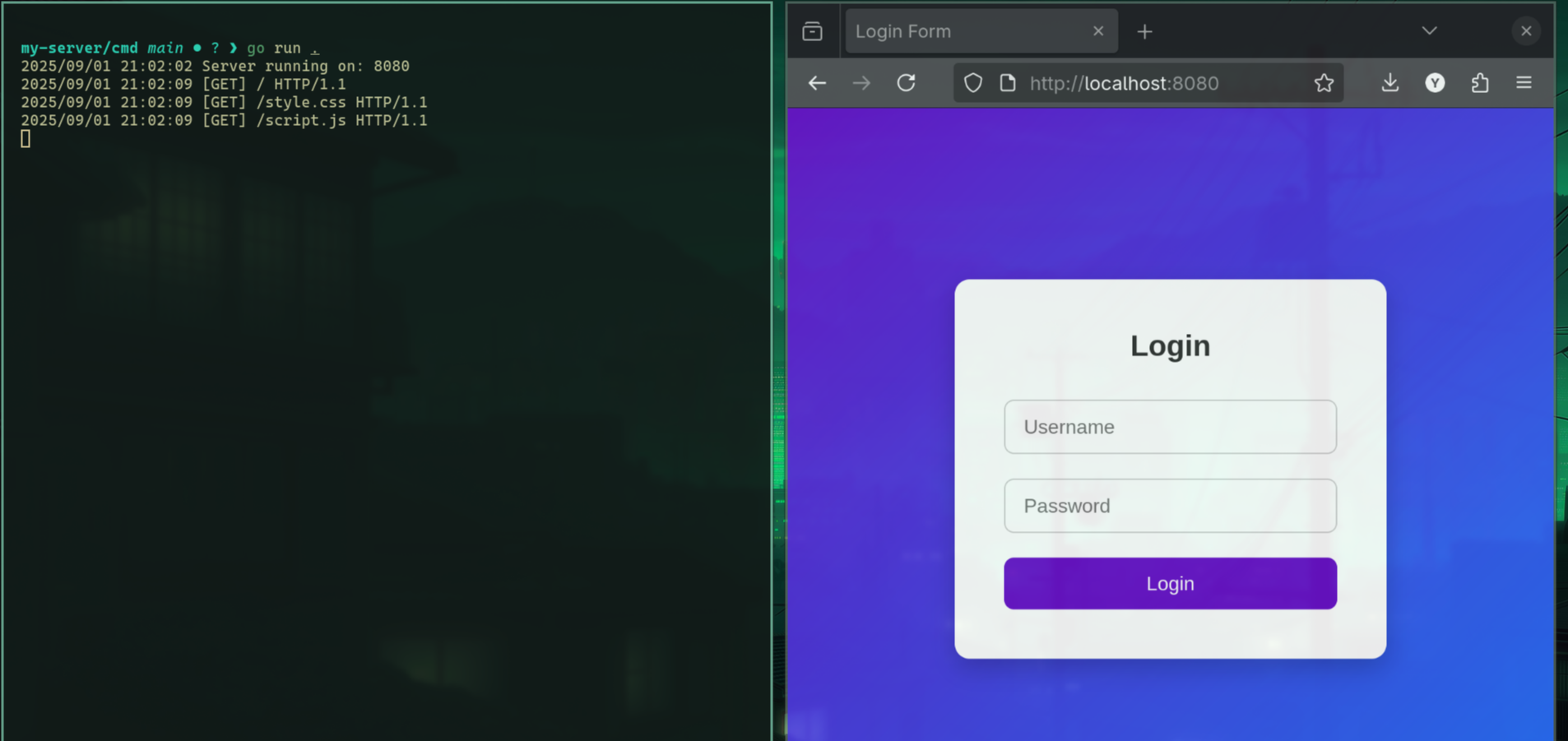
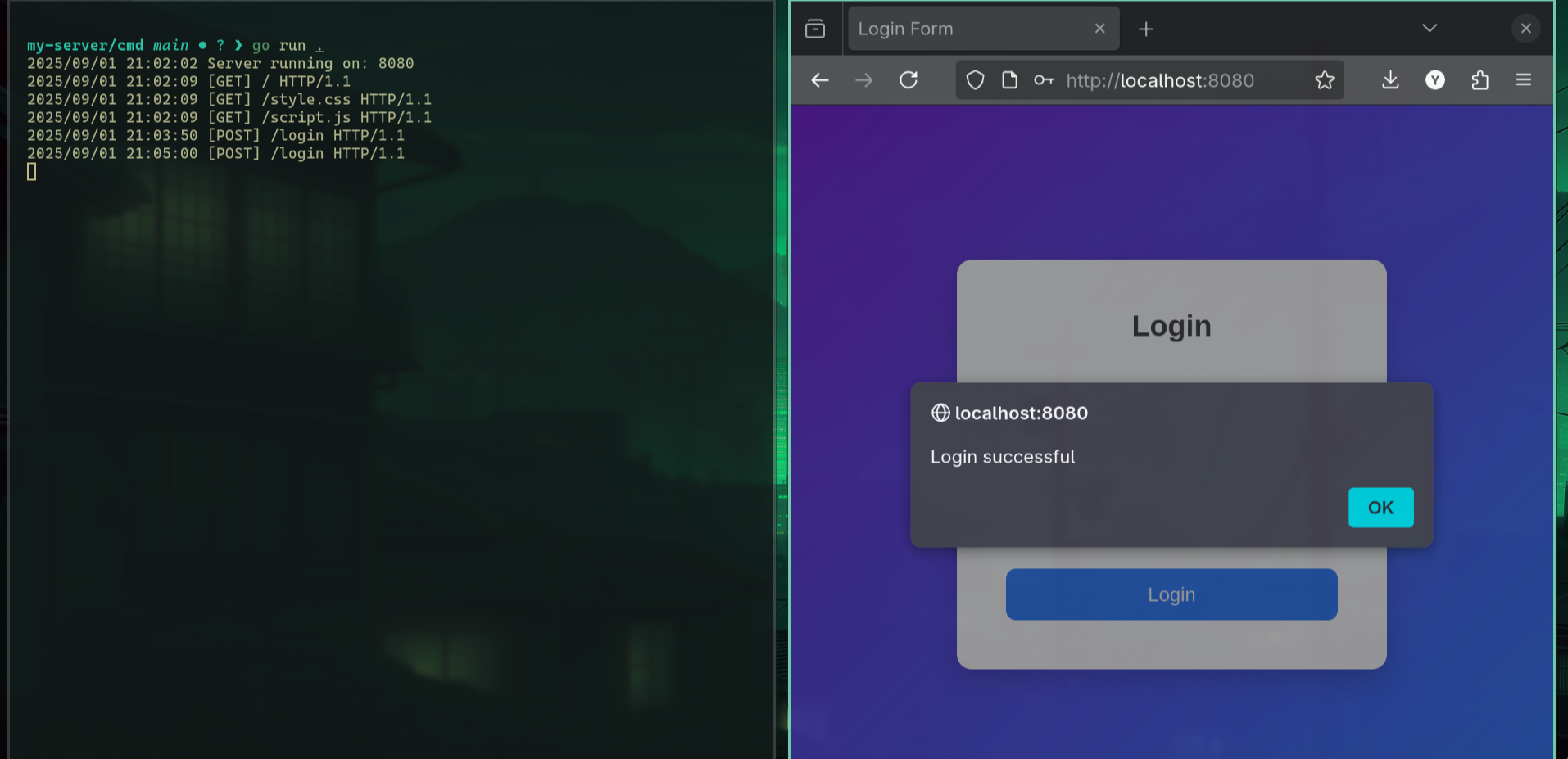
let's run the server and go to the localhost:8080/.
as we can see it was able to fetch the the style.css and the script.js and the html.
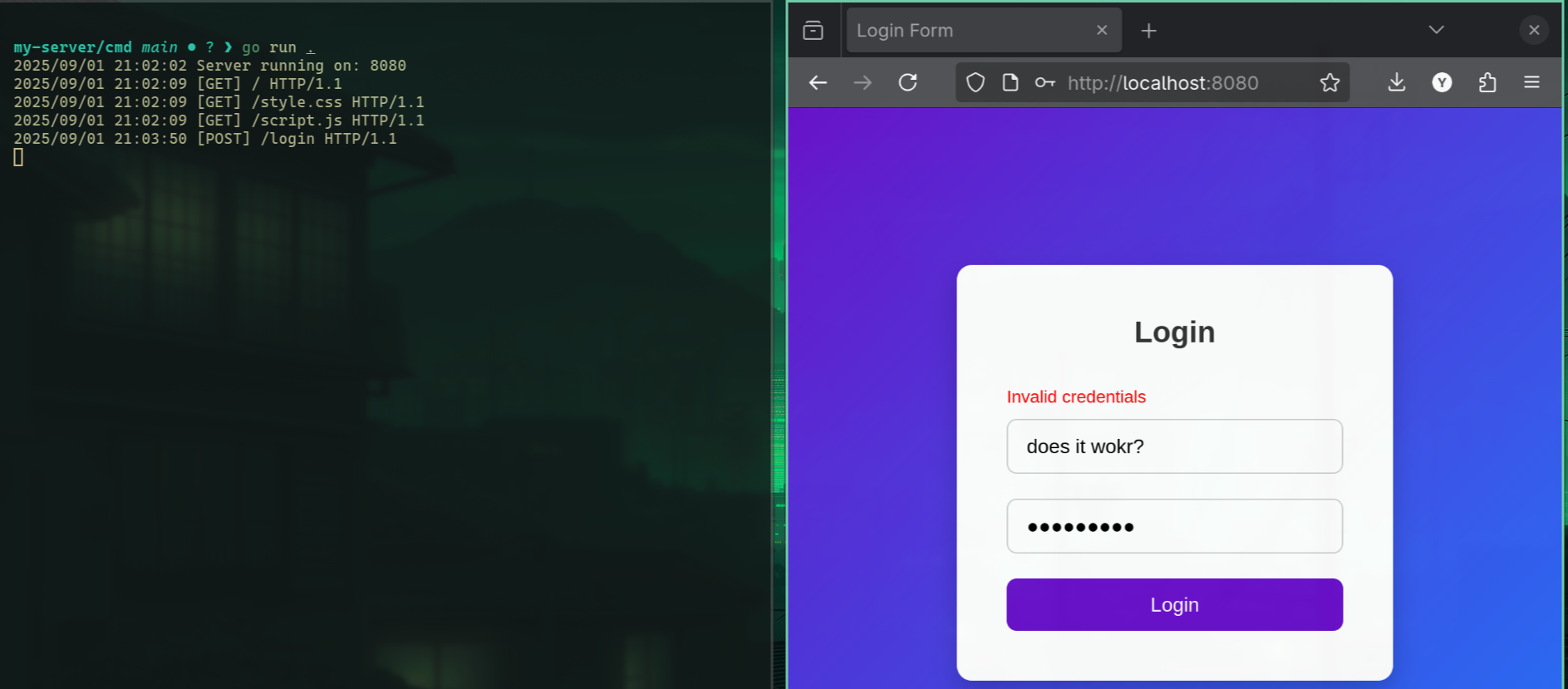
let's try to login now and try to enter something wrong as expected we got Invalid creds.
Let’s test it if we enter the correct username and password, it should show an alert message. Indeed, it works, and we can see the POST request being received by the server.
Remember, we can also see the logs thanks to the middleware.
Access parameters
This sets up a search endpoint that captures a dynamic parameter from the URL. When a request is made to /search/{firstID}, the Search handler runs. It retrieves the firstID value from the route parameters and prints it to the server console. This shows how you can access dynamic URL segments in your handler.
Loading code block...
What we can do more?
Chunked Encoding – Send responses in smaller pieces for streaming large data or files.
Binary Data Support – Serve images, PDFs, or other non-text content efficiently.
TLS/HTTPS Support – Secure connections using SSL/TLS.
Compression – Add gzip or Brotli compression to reduce response sizes.
Caching – Implement ETag or Last-Modified headers for client-side caching.
Rate Limiting – Limit requests per IP to prevent abuse.
Error Pages – Custom 404, 500, and other error pages.
Session Management – Track users via cookies or tokens.
WebSocket Support – Upgrade connections for real-time communication.