A C++ raw ICMP ping utility that sends ICMP Echo Requests to a host, measures round-trip time, and prints results. Uses threads to receive replies, calculates checksums, handles timeouts, and shows statistics including min/avg/max RTT and packet loss. Supports -c for count.
What is Ping?!
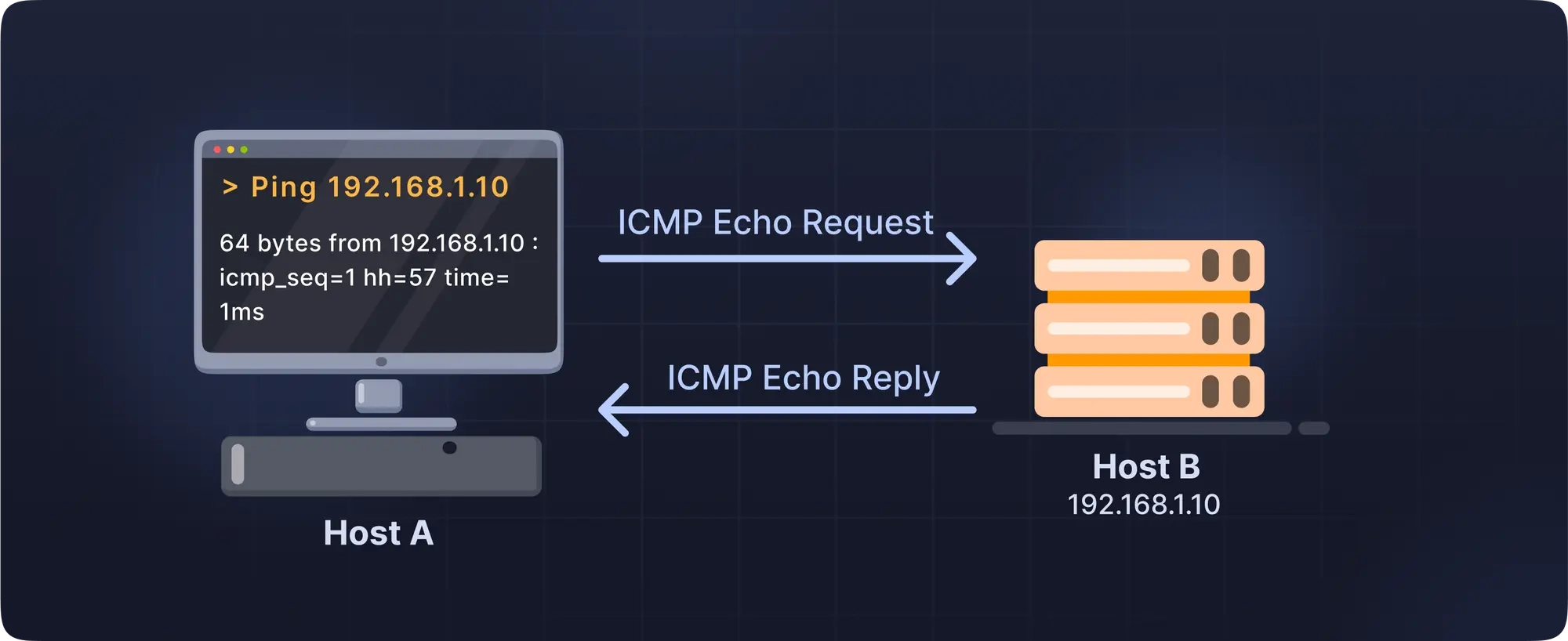
Ping is a diagnostic network utility that tests reachability of a host on an IP network and measures the round-trip time (RTT) for packets to travel from the source to the destination and back. it uses ICMP (internet control message protocol).
Packet Format
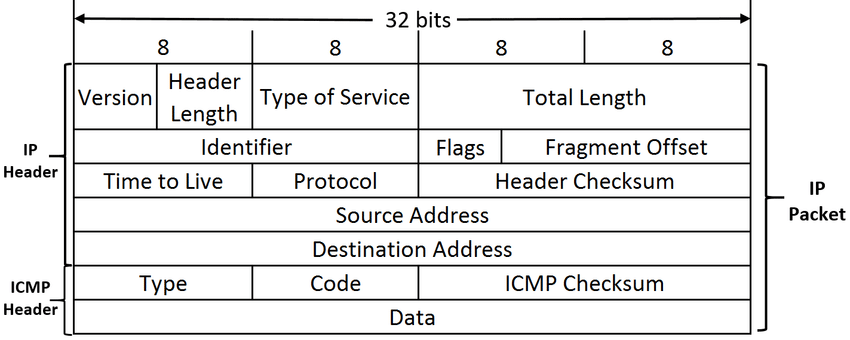
ICMP, is encapsulated inside an IP packet, meaning the ICMP packet itself comes after IP header.
type it's 1 byte, contain the type of ICMP message, each reply, destination unreachable. each request, etc.
Code 1 byte, provides more information about the type for example type 3 which mean Destination Unreachable has code like
0, Net Unreachable
1, Host Unreachable
3, Port Unreachable
Checksum 2 bytes, error-checking over the ICMP message (header + data).
Sequence Number 2 bytes, increments with each ping.
Data optional
what happens when you run ping 8.8.8.8
When you type ping 8.8.8.8 on your computer, the ping utility creates an ICMP Echo Request packet. This packet contains an ICMP header specifying the message type (8 for Echo Request), a code (usually 0), a checksum for error detection, and fields like an identifier and sequence number to match replies. The packet also includes a payload, typically 32 to 56 bytes, which is used to measure round-trip time. This ICMP message is then encapsulated inside an IP packet with your computer’s IP as the source, 8.8.8.8 as the destination, and a TTL (Time To Live) value to prevent infinite loops.
Next, the IP packet is handed to your network interface, which prepares it for transmission over your local network. If the destination is outside your LAN, your computer uses ARP (Address Resolution Protocol) to determine the MAC address of the default gateway. The packet is then wrapped in an Ethernet frame (or Wi-Fi frame) and sent to the router. The router reads the IP header, decrements the TTL, and forwards the packet towards 8.8.8.8 based on its routing table. This process continues through multiple routers across the internet until the packet reaches the destination network.
When the packet arrives at Google’s DNS server at 8.8.8.8, the server inspects the ICMP type and recognizes it as an Echo Request. It then prepares an ICMP Echo Reply, which mirrors the identifier, sequence number, and payload of the original request, and calculates a new checksum. The reply is encapsulated in a new IP packet with the server’s IP as the source and your IP as the destination. This packet traverses the internet in reverse, passing through routers that decrement TTLs and forward the packet along the correct path.
Finally, the ICMP Echo Reply reaches your local network and is delivered to your computer. The network interface strips the Ethernet frame, and the IP layer passes the ICMP payload to the ICMP handler. The ping utility matches the reply to the original request using the identifier and sequence number. It calculates the round-trip time by comparing the timestamps of sending and receiving, and displays the result in a readable format, such as:
64 bytes from 8.8.8.8: icmp_seq=1 ttl=118 time=22 ms
This entire process involves multiple layers of the network stack: the application layer generates the request, the network layer handles routing and addressing, the data link layer manages local delivery, and physical layer transmits the bits. Along the way, mechanisms like TTL and fragmentation ensure packets are delivered efficiently and safely, while ICMP provides diagnostic feedback to the sender.
Code
the code is simple all what you need just basic c++ understanding and networking.
first step we need to create a ICMP structure. This structure matches the standard ICMP packet format. The payload is filled with dummy data (0xAA) and can be used to measure latency.
Loading code block...
then we created a ICMP class warps the packet structure and provide helper methods. first we have the constructor initializes an echo request with a process-based identifier, sequence number, and payload. then we have calculateChecksum() to compute the ICMP checksum over the header + payload. This ensures packet integrity. and we have some helpers, like setInfo etc, last one is match used to compare a received ICMP packet to a send one using the type, id, and sequence.
Loading code block...
function resolveHost() users getaddrinfo() to covert a hostname to an IPv4 address. the result address is stored in sockaddr_storage for later use when we send icmp.
Loading code block...
now the main() function we start be creating the a SOCK_RAW which allow us to access lower-level protocols which ICMP in this case unlike TCP or UDP. it bypass transport layer and let's us craft's packets. note this requires root privileges.
We set a receive timeout on the socket so the program won’t block indefinitely waiting for a reply. Then we enter a loop that runs for the number of pings specified by the user with the -c option. On each iteration the program constructs and sends an ICMP Echo Request, waits up to the socket timeout for a reply, records the result (or reports a timeout), and moves on to the next sequence number.
Loading code block...
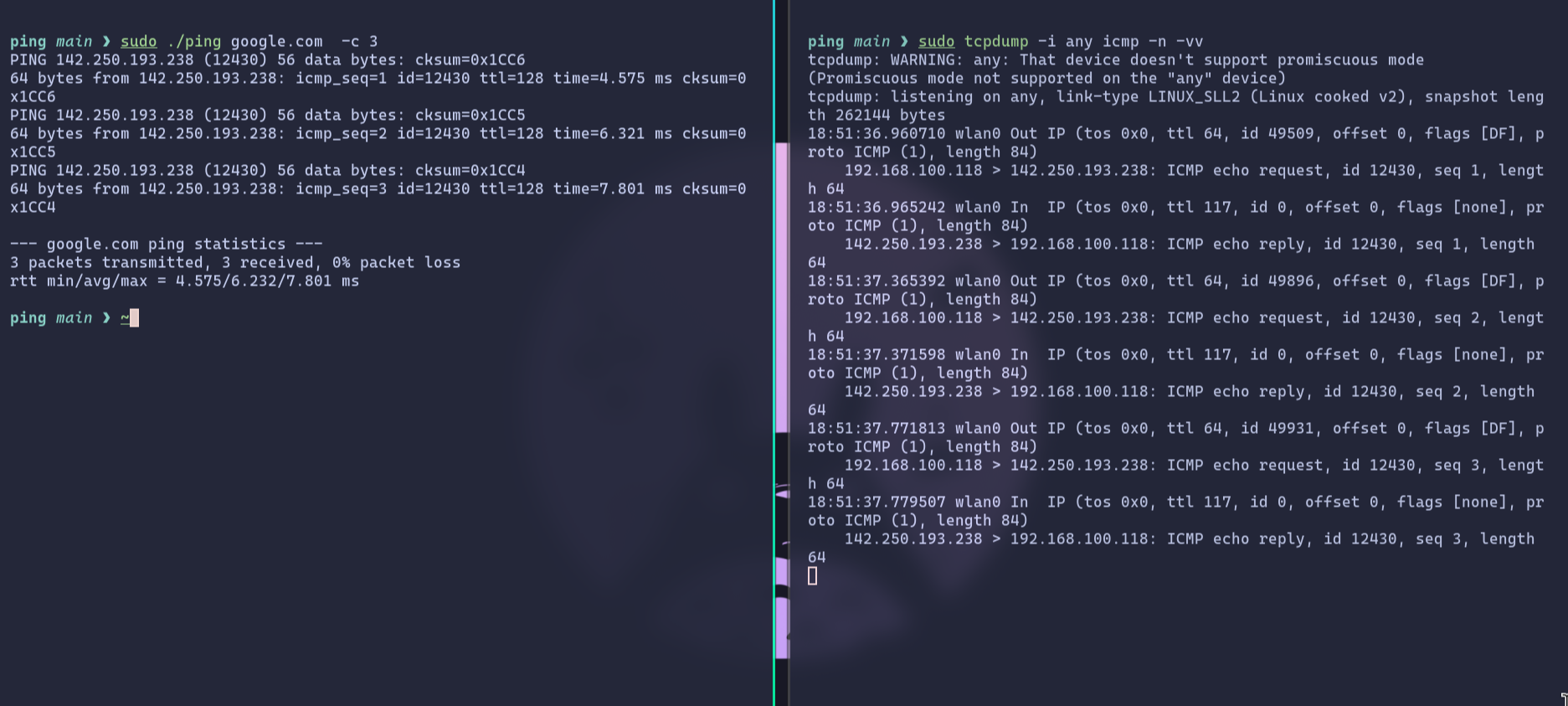
let's run the code
the left terminal, as we can see the code resolved google to 124.250.193.238 then send an ICMP echo request, and we received replies each response line indicates ICMP echo request type (8,0) with 56 bytes of data.
TO-DO
As we can see, the code is working perfectly and produces accurate ICMP responses. However, there’s still room for improvement to make it more versatile and feature-rich. For instance, we can extend it to support IPv6, allowing the program to handle both IPv4 and IPv6 targets seamlessly depending on user input. Another useful enhancement would be implementing a traceroute feature where instead of just sending echo requests, the program would gradually increase the TTL (Time-To-Live) value to trace each hop along the network path to the destination. These upgrades will make the tool more powerful and will be the focus of the next blog.